 Create Your Token
Quick answer
To create a Solana token or coin, connect a wallet such as Phantom with a little over 0.1 SOL to the token creator, enter a name, ticker, supply and logo, choose which authorities to revoke, and sign. The token is minted in under 60 seconds. To let people buy it, open a Raydium liquidity pool next.
Coin and token mean the same thing here. Every coin on Solana, meme coins included, is an SPL token.
What you need
How to create a Solana token, step by step
Set up a Solana wallet
Install Phantom, Solflare or Backpack and add a little over 0.1 SOL. You can buy SOL on Coinbase, Kraken or Binance and send it to your wallet address.
Open the token creator and connect
Go to Create Token and click Connect Wallet. Connecting only lets the site ask for signatures. No funds move until you approve a payment.
Fill in your token details
Name, ticker, a square logo, supply and decimals. Most tokens use 9 decimals, the same as SOL.
Watch the whole flow
This is the real form at soltokenlaunch.com/create-token/, filled in from top to bottom.
Token Created!
Your SPL token is live on Solana mainnet
Choose your add-ons
Social links and revoking mint, freeze or update authority are 0.1 SOL each. Buyers check mint and freeze first, so most people revoke both.
Pay and sign
Check the order summary, then approve the payment in your wallet. The token is minted in under 60 seconds.
Check it and make it tradeable
Open the mint address on Solscan to confirm supply, decimals and authorities. Then open a Raydium pool so people can buy it.
Create a liquidity pool yourself, or use the launch bundle to create the token and the pool together at a lower price. The full order of operations is in how to launch a token on Solana.
After your token is created
It shows up in your wallet
The full supply goes to the wallet you signed with. Phantom and most wallets show it on their own, usually within a minute. If it does not appear, see token not showing in wallet.
Check it on Solscan
Paste the mint address into Solscan. Supply and decimals should match what you entered. Revoked authorities show as empty, and ones you kept show your wallet.
You can still change some things
While you keep update authority, you can change the name, ticker, logo and description. Supply can only grow while you keep mint authority. Anything you revoke is locked for good. You can revoke later with the revoke authority guide.
How to disconnect your Phantom wallet
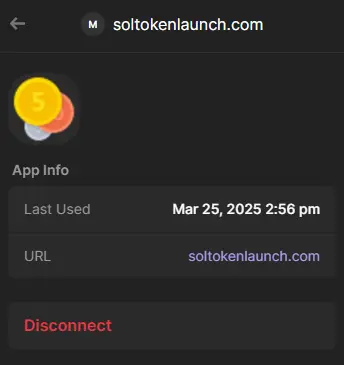
To make Phantom ask again next time, remove the site from Connected Apps:
- Open Phantom.
- Go to Settings, then Connected Apps.
- Select SOLTokenLaunch.com and tap Disconnect.
- Refresh this page.
Mistakes to avoid
Too many decimals for a huge supply
Solana caps the stored amount, so a trillion-token supply needs 6 decimals or fewer. The form checks this before you pay.
Revoking update authority with a typo
Once update authority is gone, the name, ticker and logo can never change. Check them on the summary before you sign.
Announcing before there is a pool
A new token cannot be bought until it has liquidity. Open the pool first, then share the mint address.